● Competency 04 — Automation Systems
Automation Systems
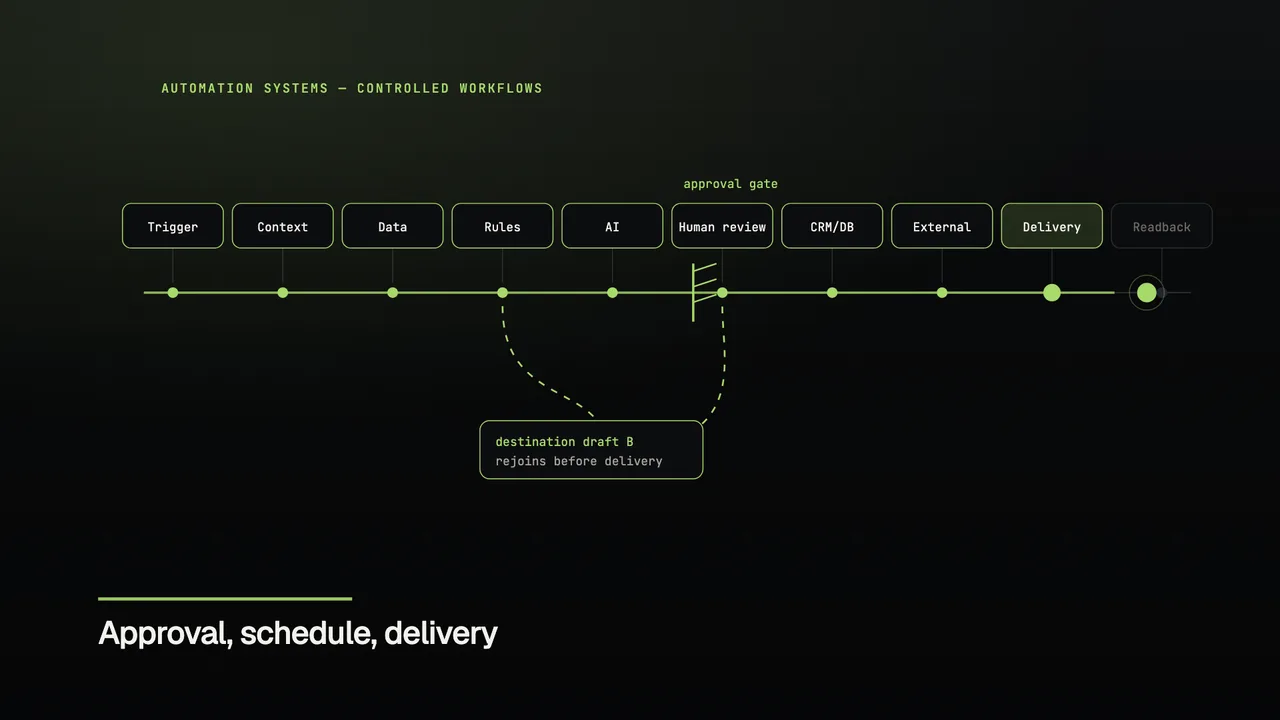
One run token moves through trigger, context, creation, review, approval and delivery — and leaves a receipt.
Business job: Move recurring work between systems without losing approval or accountability.
Explore what we build
Scroll: the run branches to a second destination draft and rejoins the track.
Trigger — A real event starts the run
Before · built · business effect
What this competency is for.
- Before
- Recurring work is spread across tools, so approval, delivery and the record of what actually happened live in different places.
- Built
- A run moves through trigger, context, creation, human approval and delivery, with each destination receiving its own form and outcome.
- Business effect
- Work moves without losing accountability: approval is a visible state, and every run closes with a receipt naming its destinations.
Explore
Automation Systems
CRM, databases, integrations and operational workflows with approval and readback.
Choose a system above to see how it moves from input to outcome.
Systems in operation
Working structures behind the competency.
- 01
Editorial autopilot
Confidence routes the work
Sources → AI validation → human review or queue → publish → history
- 02
Multi-channel publishing
Approval-bound delivery
Content → approval → durable outbox → provider → reconciliation
- 03
Campaign distribution
Idempotent scheduled runs
Variants → languages → groups → schedule → retry → readback
- 04
Sales operations
AI does not control money
Classify → price → verify payment → activate → monitor → renew
What keeps a run straight
- 01
Approval is an explicit state between creation and delivery.
- 02
A run can branch for a second destination and rejoin the main track.
- 03
Every run ends with a receipt naming its destinations and outcome.
Technical details
- Each run carries one token, so a branch can be followed back to the point it left the track.
- Approval sits between creation and delivery, with the approving step visible.
- Delivery is reported per destination, with the run identifier attached.
Surfaces shown: website-native SVG, Canvas and native-ratio campaign media.
Have work that should move on its own?
Build